Samsung T7 Shield 5-Bay SSD Dock
- Low stock - 5 items left
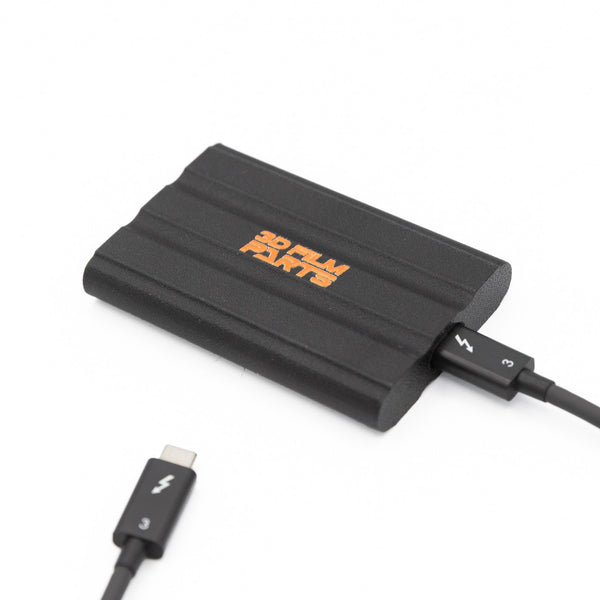
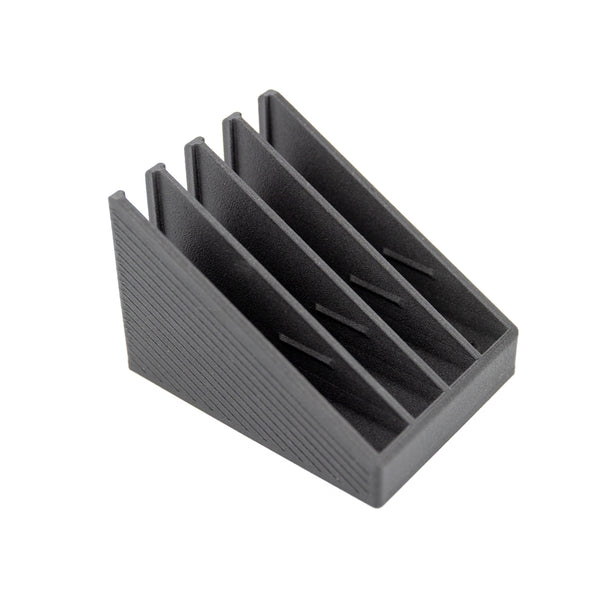
One T7 Shield plugged in and working. Four more on standby right above it. This is a desktop dock for the Samsung T7 Shield SSD with one active, cable-locked hot-swap bay at the bottom and four storage bays on top. Finish with one drive, pull it, slide the next one in. No hunting for a cable, no drives sliding around the desk.
Five Shields is a few thousand dollars of drives and footage. A$79 to give them a proper home is cheap insurance.
How it works
Take the M3 bolt out of the base with a 2.5 mm Allen key and lay your USB-C cable in the channel at the back of the bottom bay. Do the bolt back up and it works like a grub screw: it pushes up on the plug and pins it in place, so the cable can't wander or get dragged out when you swap drives.
Then slide your T7 Shield into the bottom bay, USB-C end first. Two rails in the floor ride in the Shield's own grooves, so the drive lines up with the plug every time and seats itself. When you're done, pull it out by the end that sticks out the front and push the next one in. That's the whole hot-swap.
The four top bays are storage. The Shields stand on end, and small guide lugs sit in the grooves so the drives don't rattle about, but they still lift straight out. Only the bottom drive is connected. The top four are on standby.
USB-C cable opening
The cable channel is 12.75 x 7.6 mm, flaring to about 14 x 9 mm where the cable leaves the back. It is sized for Samsung's own USB-C cable (plug body 12.7 x 7.2 mm), so it holds that plug snug and straight. Plenty of third-party cables fit too, but some have chunkier plug bodies that won't. If your cable's plug is bigger than 12.75 x 7.6 mm, use the Samsung one, or message us and we'll check it with you.
TPU glass fibre
This dock is printed in TPU glass fibre, a relatively new material we've started using on some of our products. It's TPU filled with glass fibre, and it gives you the best of both: it flexes a little and soaks up a knock, but stays firm and strong, so it never feels soft or rubbery. It's tough, impact resistant, handles heat well, and has a matte to satin finish that looks right next to the Shields' black rubber and hides fingerprints.
There are no rubber feet on this one, and it doesn't need them. The base is textured and grippy, so the dock stays where you put it.
Only available in matte black.
Size on your desk

The dock itself is 76 mm wide, 80 mm deep and 56 mm tall. With Shields standing in the top bays it is about 114 mm tall, and the active drive sticks out the front by about 33 mm, so allow roughly 113 mm of depth with a drive in.
Running the original T7?
This dock is shaped for the T7 Shield. If you've got regular aluminium T7s, put them in our Samsung T7 Shield Sleeve. It's a TPU glass fibre cover that makes a regular T7 the same size and shape as a Shield, so it drops straight into this dock, including the active bay. Run a mix of Shields and sleeved T7s and they all fit.


The T7 Shield Sleeve turns a regular T7 into a Shield-sized drive.
Other T7 docks we make
- Samsung T7 Shield 4-Bay Desktop Dock: four Shields, each with its own cable slot, so all four stay plugged in at once.
- Samsung T7 and SD Card Dock: the same five-bay idea for the original aluminium T7, plus two SD card slots.
Specifications
- Fits: Samsung T7 Shield portable SSD (any capacity), or a regular Samsung T7 in our T7 Shield Sleeve
- Bays: 1 active hot-swap bay (bottom, connected) + 4 storage bays (top, standby)
- Cable lock: M3 bolt from underneath, works like a grub screw, 2.5 mm Allen key
- USB-C cable channel: 12.75 x 7.6 mm, sized for Samsung's own cable
- Material: TPU glass fibre, matte black
- Base: textured and grippy, no rubber feet needed
- Size: 76 x 80 x 56 mm (W x D x H), about 114 mm tall with drives docked
- Made in Melbourne, Australia by 3D Film Parts
Questions
Are all five drives connected?
No. The bottom bay is the active one, wired to your computer with your USB-C cable. The four top bays hold drives on standby, ready to swap in.
Does it fit the original Samsung T7?
Not on its own. The T7 is smaller than the Shield. Put it in a T7 Shield Sleeve and it fits every bay. Or get the Samsung T7 and SD Card Dock, which is made for the T7.
Which USB-C cable should I use?
Samsung's own cable is the safe bet: the channel is sized for its plug. Third-party cables work if the plug body is no bigger than 12.75 x 7.6 mm.
Will the cable pull out when I swap drives?
No. Do up the M3 bolt and it pins the plug in the channel, so the cable stays put while drives go in and out.
Does it need rubber feet?
No. The TPU glass fibre base is textured and grippy on its own.
*Drives and cables not included.
Shipping and delivery
🇦🇺 Australia. $10 on orders under $99, free over $99.
🇺🇸🇨🇦 United States and Canada. Your import duties and clearance fees are prepaid by us before the parcel leaves Australia and are included in the shipping rate you pay at checkout. There is nothing further to pay on delivery.
🌏 Everywhere else. Your own country may charge import fees when the parcel arrives. What changed on 1 July
When your order ships
We pack Monday to Friday in Melbourne and ship with Australia Post. Order before 12:00pm AEST on a business day and your parts normally go out in 1 to 2 business days, often the next morning. During a big sale or a busy run that can stretch to 5 business days. That is the outside number, not the usual one.
How long it takes to reach you, counting from the day it ships:
- Australia, express: 1 to 2 business days
- New Zealand and South East Asia: 3 to 7 business days
- United States and Canada: 5 to 10 business days
- United Kingdom and Europe: 5 to 12 business days
- South America: 10 to 15 business days
These are estimates, not guarantees. Customs and peak periods add time.
If the tracking stops moving
Once your parcel lands in your country it is handed to your national postal service, and our tracking link often stops updating at that point. That is normal: it has not been lost, it has just changed hands. Take the same tracking number and put it into your own country's postal site, which is the live one.
European Union
Since 1 July 2026 every commercial parcel is assessed regardless of value. Your carrier collects import VAT plus a flat customs duty before delivery, and will contact you by SMS or email with the amount. Please give us a mobile number at checkout so they can reach you, because a parcel they cannot reach you about is sent back.
Full detail is on our shipping page.